View
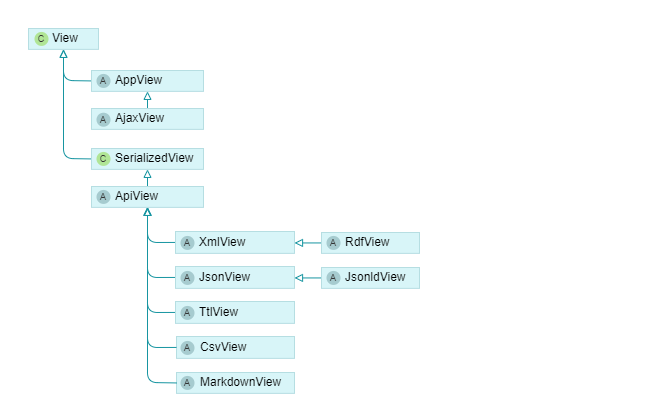
Depending on the rendering format, as determined by the URL extension or the request Accept header, different view classes are used.
- AppView: Renders HTML pages for the browser and directly inherits from CakePHP’s View class. AjaxView is a subclass of AppView that omits layout rendering.
- ApiView: The base class for rendering structured data formats like JSON or XML, derived itself from CakePHP’s SerializedView class. The ApiView based classes are also used in the export pipelines to generate TEI-documents and other structured data formats.
Rendering HTML for the Browser
The AppView class uses templates to render HTML pages, located in the templates directory
and named after the controller and action, see for example templates/Users/index.php.
This is a CakePHP convention. Some actions change the convention by calling $this->render()
with a template name directly in the controller. This way, templates can be shared between actions,
for example to always use the same template for public pages, help pages, and wiki pages.
The AppView class embeds the page content into a layout which is located in the templates/layout directory.
Templates for the project databases are located in the plugins/Epi/templates directory.
Shared rendering logic is encapsulated in helper classes, which are located in the src/View/Helper directory
on the application level and in the plugin folders.
Support for rendering of entity collections in tables:
- TableHelper: Generates tables for entities, entity collections and arrays.
- TreeHelper: Generates tree markup, e.g. for categories. The helper supports trees for selecting entities. Can be used in combination with the table helper to add tree markup to tables.
Support for rendering of entities and their fields:
- BaseEntityHelper: The class is central to rendering entities.
Its function
entityForm()is called to view entities and to create input forms. Its functionsectionList()is called for generating documents such as articles. - EntityHtmlHelper: Derives from BaseEntityHelper helper for markup specific to non-editing HTML output for entities.
- EntityInputHelper: Derives from BaseEntityHelper helper for form input generation when editing entities.
- EntityMarkdownHelper: Derives from BaseEntityHelper helper and overrides functions for Markdown rendering.
Utilities for rendering HTML elements:
- ElementHelper: Provides basic functions for creating HTML tags.
- LinkHelper: Generates links and buttons.
- MenuHelper: Generates different kinds of menus with the function
renderMenu(). - FilesHelper: Supports uploading files, displaying previews and thumbnails.
- TypesHelper: Provides access to the types configuration.
Rendering API Data
JSON, XML, CSV
The base formats for API access are JSON, XML and CSV. Epigrafs supports rendering the full database content with all fields in those formats. Therefore, the formats can be used to import and export data.
For collections, only columns selected in the query parameters are rendered. Columns are configured using extraction keys in the types configuration.
For entities, the rendered fields are determined by the entity’s type.
RDF, JSON-LD, Turtle
From the base formats, triple formats are derived in the RdfView, JsonLdView, and TtlView classes. For collections, the hydra standard is used. For entities, the generated triples have to be configured in the types on the project database level.
Markdown
The MarkdownView class is used for generating plain text from the database content. This may prove useful for full text search indexes and machine learning approaches, for example, to use and train large language models.
Rendering of annotations
XML fields can contain annotated text segments, consisting of XML tags in the text. There are three annotation types:
a) Atomic annotations refer to one annotation entity.
Annotation entities are links or footnotes entities
that contain the tag ID in their from_tagid field.
b) Molecular annotations refer to multiple annotation entities with one tag.
Each annotation entity is rendered as one annotation box,
they share the tag ID in their from_tagid field.
c) Null annotations don’t refery to any annotation entity,
they only consist of an XML tag.
TODO: Document when empty annotation boxes are generated even for null annotations.
Different text segments can be annotated with the same tag ID, thus, combining multiple ranges with the same annotation is possible. This allows overlapping annotations.
The lifecycle of annotations in the frontend:
- When rendering annotations in the HTML frontend, they are downcasted from the database XML content to HTML. Annotation tags within the content and annotation boxes next to the content are generated.
- When editing annotations, annotation tags are upcasted from HTML (view model)
to the XmlEditor’s internal model (its data model, see the
XmleditorXmltagEditing()plugin). Annotation boxes are handled by the Epigraf frontend model layer (AnnotationsModel()in models.js). - Edit operations such as adding or removing annotations operate in the XmlEditor’s data model. The XmlEditor downcasts annotations from its data model to the interactive editable element (default downcasting) and to the form input element for saving data (data downcasting). Events are fired that trigger adding or deleting annotation boxes (rendered next to the input field) and opening annotation popups. The annotation boxes contain the references to the annotation entities (links or footnotes).
- When form data is sent to the server, the HTML content is converted back to XML (derendering).
Data is passed from one stage to another by attributes. Additional attributes are used to pass data from the XmlEditor’s data model to the annotation boxes and back from the annotation editors (popups, e.g. for choosing a property) to the XmlEditor’s data model.
1. From the database to the view level
When rendering the frontend (HTML) or exporting data (API), the database content (XML) is transformed to the respective output format.
For API output formats, three attributes are added to each XML element
in the method BaseEntity::injectXmlAttributes():
data-link-targetcontains the table prefixes ID of the target property, article, section, item or footnote. For example, if the annotation refers to a property with the ID 123, the data-link-target attribute contains the value “properties-123”.data-link-iricontains the IRI path of the target, for example “properties/language/de”.data-link-valuecontains the caption of the target entity, for example “German”.
The added attributes simplify processing the data, for example, using XSLT. They provide shortcuts to basic links and footnotes data that, otherwise, needs to be looked up in the respective entities using the tag IDs.
For HTML output, annotation rendering is based on the links and footnotes configuration. Rendering consists of annotation tags (in the content) and annotation boxes (next to the content).
Annotation tags are rendered according to one of the following patterns:
a) Formatted text
<span class="xml_tag xml_tag_insec xml_format"
      data-tagid="000004206246988741898148271884"
      data-type="insec">
  deo
</span>
b) Standalone text
<span class="xml_tag xml_tag_del xml_text"
      data-tagid="000004210269403836805555651685"
      data-type="del"
      data-attr-num_sign="0">
  [---]
</span>
c) Text surrounded by brackets
<span class="xml_tag xml_tag_person xml_bracket"
      data-tagid="4d6822113a0c458e9f6aea14bc73cd3d"
      data-type="person"
      data-link-target="properties-123"
      data-link-value="Darth Vader"
      title="Person">
  <span class="xml_bracket_open">{</span>
  <span class="xml_bracket_content">Darth vader</span>
  <span class="xml_bracket_close">}</span>
</span>
The name of the rendered HTML tag defaults to span, but can be configured.
Classes are added and used for styling the elements.
Each element has a class xml_tag and a class xml_{type} where {format} is one of
format, text or bracket, depending on the annotation type.
The name of the original XML element is added as a class following the pattern xml_tag_{tagname}
as well as in the data-type attribute. The element ID that refers to links or footnotes entities
is added in the data-tagid attribute.
If annotations refer to properties, the property caption is added in the title attribute, which is used to show a tooltip on mouse hover.
All additional attributes of the original XML element are added as data attributes
with the prefix data-attr- followed by the attribute name.
In the original XML data, standalone text annotations are empty elements
and bracketed annotations do not contain the brackets as part of their content.
Their content is determined solely by the configuration and generated by the rendering logic
(see the XmlStylesBehavior::renderXmlField() method).
Annotation boxes are rendered in BaseEntityHelper::annoLists().
Each annotation box consist of a container div with a span child element containing the caption.
The boxes follow the pattern:
<div class="doc-section-link"
     data-row-table="links"
     data-row-id="112235"
     data-group="transcription"
     title="neue Zeile"
     data-switch-selector="transcription"

     data-from-id="303411"
     data-from-tab="items"
     data-from-field="content"
     data-from-tagid="000004210269390528935185261323"
     data-from-tagname="z"

     data-to-id="253"
     data-to-tab="properties"
     data-to-type="linebindings"
 >
    <span class="doc-section-link-text">neue Zeile</span>
</div>
For links annotations, in editing mode,
the additional data-deleted attribute signals whether an annotations was deleted.
It is not deleted, only hidden, to allow for undo operations.
Additional input elements appear after the span
element. One input is generated for each of the following fields:
id, deleted, root_id, root_tab,
from_id, from_tab, from_field, from_tagid, from_tagname,
to_id, to_tab, to_type.
The to_type values contain the target property type and distinguishes multiple annotation
entities that are combined into a molecular annotation.
For footnote annotations, the attributes data-to-id, data-to-tab, and data-to-type are omitted from the boxes.
No inputs are nested inside the annotation boxes.
Instead, footnote elements are created in the dedicated HTML sections.
Each footnote element follows the patterns:
<div id="doc-footnote-id-000004271839696436342592684532"
     class="doc-footnote"
     data-tagid="000004271839696436342592684532"
     data-row-table="footnotes"
     data-row-id="10396"
     data-row-type="app2"
     title="a"
 >
    <div class="doc-footnote-number">a</div>
    <div class="doc-footnote-content">
        <div class="doc-field doc-fieldname-content" data-row-field="content">
            <div class="doc-field-content">
                HERE COMES THE FOOTNOTE TEXT
            </div>
        </div>
    </div>
</div>
In editing mode, the additional data-deleted attribute signals whether a footnote was deleted.
It is not deleted, only hidden, to allow for undo operations.
Input elements are generated for each of the following fields:
id, root_id, root_tab,
from_id, from_tab, from_field, from_tagid, from_tagname,
name
The footnote content container is handled by the XmlEditor widget and includes a hidden form input element as well as the editable area.
2. From HTML to the XmlEditor and back to HTML
In the frontend, the XMLEditor widget is used to edit XML fields with annotations. The widget is based on the CKEditor and supports the same annotation patterns described above. When activating an input field attached to the XMLEditor widget, the CKEditor upcasts the markup to its internal model. Copy & paste operations are also supported, and the pasted content is upcasted to the internal model in the same way.
Upcasting triggers an event on every element that is used to look up the annotation boxes, referring to links or footnotes entities. Missing annotation boxes and missing footnotes are then added.
After upcasting, the XmlEditor downcasts the internal model to HTML and updates the input field content with the downcasted HTML. All editing operations - adding or deleting annotations - are performed on the internal model, and the downcast functions are responsible for keeping the markup consistent.
Downcasting renders the tags in the same way as HTML is rendered
in XmlStylesBehavior::renderXmlField() in the backend.
Nevertheless, only necessary attributes are directly transferred between editor view and editor model.
Upcasting and downcasting results in the following attributes in the editor model respective view:
| Model | View | Explanation |
|---|---|---|
| data-tagid | data-tagid | The original tag ID. |
| data-type | data-type | The original tag name. |
| data-value | data-value | The tag content. |
| data-link-target | data-link-target | The target entity’s table-prefixed ID. |
| data-link-value | data-link-value | The target entity’s label, used in the annotation box. |
| data-attr-{name} | data-attr-{name} | Custom attributes of the original XML element. |
| class | Rendering information including annotation type. | |
| data-new | Whether the annotation was created by the toolbar. | |
| data-selected | The selected text before the annotation was created using the toolbar. |
The data-value attribute’s content differs by annotation type. For opening or closing brackets, it contains the values rendered as brackets. For standalone text tags, it contains the rendered content of the tag. For other tags, it is empty and the content is determined by the tag name and the rendering logic.
Custom attributes are up- and downcasted to attributes prefixed with data-attr- in order to
distinguish them from the attributes that are used for the annotation rendering logic.
3. From HTML back to the database
Before saving the content of an XML field, i. e. when the submitted form data is marshalled,
the rendered HTML markup is removed and the original XML elements are reconstructed
in the XmlStylesBehavior::deRenderXmlFields() method.